
How to Check Scheme Benefit Status on Seva Sindhu Portal
The Seva Sindhu portal is a valuable initiative by the Government of Karnataka, providing citizens with access to a variety of government schemes and services. If you’ve applied for a benefit or service, you might be eager to know the status of your application. Fortunately, the Seva Sindhu portal offers a simple and user-friendly way to check the status of various scheme benefits.
In this article, we’ll walk you through the steps to check the status of your scheme benefits on the Seva Sindhu portal. Whether you’re checking the progress of an Aadhaar-linked benefit, financial aid, or any other government scheme, this guide will make the process straightforward and easy.
What Is Seva Sindhu Portal?
The Seva Sindhu portal is an online platform designed to provide access to government services and schemes for the people of Karnataka. It allows citizens to apply for and access a wide range of services, including:
The portal aims to make these services accessible online, making it easier for citizens to access benefits without visiting government offices physically.
Why Check Your Scheme Benefit Status?
Checking your scheme benefit status is crucial to:
Know if your application has been processed or if there are any updates on the approval.
Track progress of your application to ensure you’re receiving the benefits you’re entitled to.
Resolve issues quickly in case of errors or delays in processing your request.
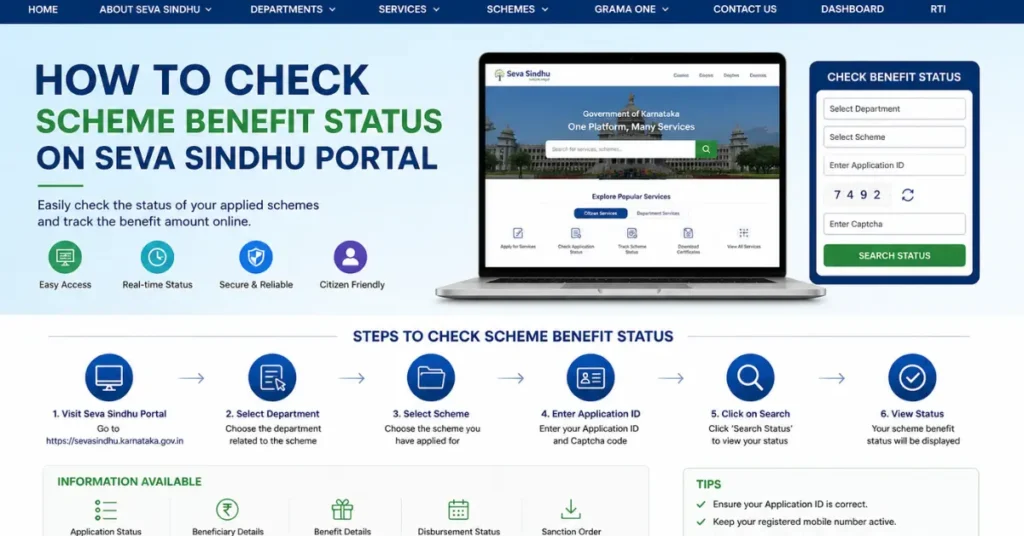
Steps to Check Scheme Benefit Status on Seva Sindhu Portal
To check the status of your scheme benefits on the Seva Sindhu portal, follow these simple steps:
Visit the Official Seva Sindhu Portal
Log In to Your Account
Navigate to ‘Track Application’ or ‘Status.’
Once you’ve logged in, the portal will show your dashboard with various options related to government schemes and services. To check the status of your benefit, look for the following sections:
‘Track Application’: This is where you can find information about the status of your applications for various schemes.
‘Status of Scheme Benefits’: This may also be labeled as ‘Application Status’ or ‘Track Status’ depending on the type of scheme.
Click on the appropriate link to track your benefit status.
Enter Required Information
To track your application, you’ll need to enter certain details that are associated with the scheme or application you applied for. Depending on the scheme, you may need to provide:
Application Number: This is the unique reference number you received after submitting your application.
Aadhaar Number: For certain schemes, you may be asked to provide your Aadhaar number.
Mobile Number: You might also be required to input the mobile number linked to your application for verification.
Enter the required information carefully to avoid errors.
View Status
After submitting the required details, click the ‘Submit’ or ‘Track Status’ button. The portal will show the status of your scheme benefit, which could include:
Application Approved: Your application has been successfully processed, and the benefit is being provided.
Under Process: Your application is still under review.
Rejected: The application has been rejected, often with a reason for rejection.
Pending Documents: If your application is missing required documents, this will show up, and you may be asked to submit the documents.
Download or Print Status (If Needed)
In case you need a hard copy or digital record of your benefit status:
What to Do If Your Application is Pending or Rejected?
If you find that your application is pending or rejected, don’t worry. Here’s what you can do:
Review the Application Details
Ensure that all the details in your application are correct. If your application was rejected or marked as pending due to missing information, make sure to update your details or submit any required documents.
Contact Seva Sindhu Support
If you’re unsure why your application is stuck or rejected, contact Seva Sindhu support. They can provide more details and help resolve any issues with your application.
Here’s how to contact Seva Sindhu support:
Call their helpline for immediate assistance.
Use the contact form on the portal to send an inquiry.
Visit the local Seva Sindhu office if necessary for more personalized help.
Submit Missing Documents
If your application is missing documents, make sure to submit the required documents. You can typically upload them directly to the portal.
Tips to Ensure Faster Processing of Scheme Benefits
To ensure your application is processed smoothly and quickly, here are some helpful tips:
Double-check Your Application Details
Before submitting any application, double-check all your details to ensure there are no mistakes. Incorrect information can lead to delays or rejections.
Submit Complete Documents
Make sure you submit all necessary documents for the scheme. Incomplete submissions are one of the most common causes of delays.
Keep Track of Deadlines
Make sure you submit your application before the deadline. Late submissions are often rejected or delayed.
Use a Reliable Internet Connection
To avoid issues during the submission process, ensure that you’re using a stable internet connection. This reduces the chances of errors or timeouts.
FAQs
Final Words
Checking the status of your scheme benefits on the Seva Sindhu portal is a simple process that can save you time and effort. By following the easy steps outlined in this guide, you can quickly track the progress of your application and take action if needed.
Always ensure that your application is complete, and don’t hesitate to contact Seva Sindhu support if you encounter any issues. With the right steps, you can easily access the benefits you deserve through the Seva Sindhu portal.


