
Prevent OTP Delay for Seva Sindhu e-KYC — Simple Solutions
The Seva Sindhu portal offers essential government services to the people of Karnataka, including the e-KYC (Know Your Customer) process for identity verification. However, one of the most common frustrations users face while completing the e-KYC process is the delay in receiving the One-Time Password (OTP).
This can be particularly troubling when you’re trying to complete an important transaction or register for services. OTPs are used for authentication, and without them, it’s impossible to proceed with the e-KYC process. So, if you’re facing OTP delays, you’re not alone.
In this article, we’ll explain the reasons behind OTP delays, how to prevent them, and what steps you can take to ensure the process runs smoothly.
What is OTP in Seva Sindhu e-KYC?
An OTP (One-Time Password) is a temporary passcode sent to your registered mobile number or email. It’s used to verify your identity and ensure that the person performing the transaction or registration is authorized to do so.
In the context of Seva Sindhu e-KYC, OTPs are crucial for:
Verifying your identity during the registration process.
Completing steps like bank account linkage, Aadhaar verification, and other services that require confirmation of your personal details.
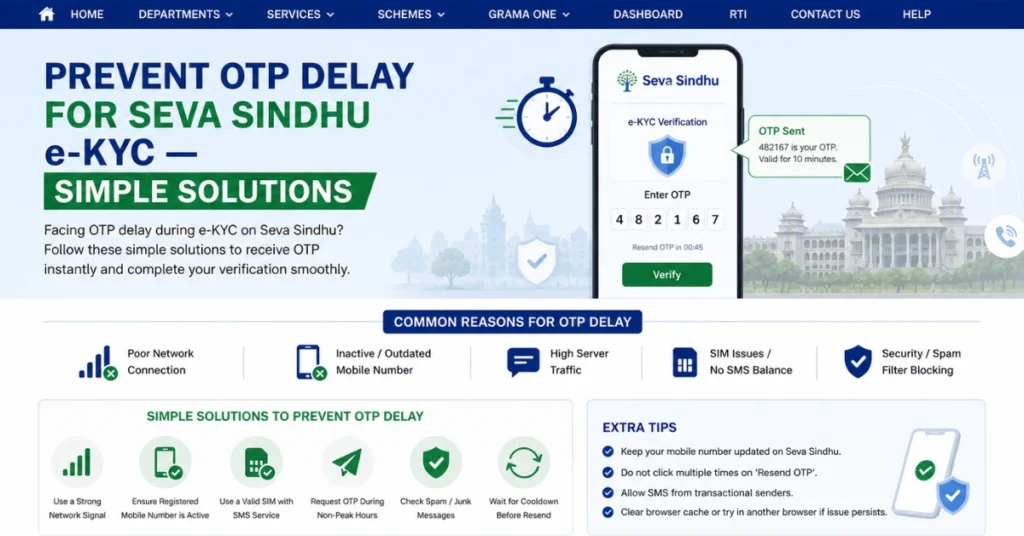
Why Do OTPs Get Delayed on Seva Sindhu e-KYC?
There can be several reasons why the OTP delay happens when completing e-KYC on Seva Sindhu:
Network Issues
The most common reason for OTP delays is poor network coverage. If your mobile network is weak or intermittent, the OTP might take longer to be delivered, or in some cases, it might not arrive at all.
Server Overload or Maintenance
If there is heavy traffic on the Seva Sindhu portal or if the servers are undergoing maintenance, this can lead to delays in sending OTPs. This typically happens during peak hours or when there are more people trying to complete their e-KYC at the same time.
Incorrect Mobile Number or Email
If the mobile number or email you registered on Seva Sindhu is incorrect, the OTP may be sent to the wrong contact. This is why it’s essential to double-check that your details are correct during registration.
Delays from the SMS Service Provider
Sometimes, SMS delivery services face delays, especially if they’re experiencing high traffic or technical problems. This can result in a delay in receiving the OTP on your phone.
Two-Factor Authentication or Spam Filters
If your mobile phone has a spam filter or you’re using a virtual phone number, OTP messages might get blocked or filtered. Some devices or apps automatically classify OTP messages as spam, delaying the process.
How to Prevent OTP Delays for Seva Sindhu e-KYC
If you’re experiencing OTP delays, follow these steps to prevent further issues and ensure that you can complete your e-KYC process smoothly:
Check Your Network Connection
The first step is to ensure that you have a strong network connection. If you’re on a mobile network, make sure that:
If you’re using Wi-Fi, make sure the connection is stable. Try switching between mobile data and Wi-Fi to see which one works better.
Verify Your Contact Information
Make sure that the mobile number and email address linked to your Seva Sindhu account are correct:
Ensure OTP Message is Not Blocked
Check if the OTP message is getting blocked or filtered:
Check your spam or junk folder: Sometimes, OTP messages may be misclassified as spam, so make sure to check your SMS spam folder and email junk folder.
Disable your spam filter: If you have any app or phone settings that automatically filter messages, try disabling them temporarily.
Add the sender’s number to your contacts to ensure OTPs are not blocked.
If your phone uses any security apps or third-party spam filters, temporarily disable them while completing the e-KYC.
Try Using a Different Phone Number
If the OTP is consistently delayed or you’re not receiving it, try using a different phone number:
Use a different network provider: If you’re using a network with poor coverage, try switching to a different service provider or use a landline (if available for OTP reception).
If possible, update your phone number in the Seva Sindhu portal and retry the process.
Wait for Server Traffic to Settle
If you’re trying to complete your e-KYC during peak hours (such as late afternoons or during holidays), the Seva Sindhu portal may be experiencing higher-than-usual traffic. This can result in delays in processing and OTP generation.
How to fix:
Use the Official Seva Sindhu Mobile App
Instead of using the web portal, you can try using the Seva Sindhu mobile app. The app may provide a more stable experience with fewer delays. Here’s how to do it:
Download the official Seva Sindhu app from the Google Play Store or Apple App Store.
Log in using your registered credentials.
Try completing the e-KYC process within the app, and the OTP may come through more reliably.
Contact Seva Sindhu Support
If the above steps don’t resolve the issue, your last resort should be to contact Seva Sindhu customer support:
FAQs
Final Words
Experiencing OTP delays during Seva Sindhu e-KYC can be frustrating, but the good news is that most delays can be resolved with simple fixes. By checking your network connection, ensuring your contact information is correct, and following the steps outlined above, you can minimize OTP issues and complete the e-KYC process smoothly.


