
Seva Sindhu Wrong Department After Application ID Entry
If you’ve recently submitted an application on the Seva Sindhu Portal and tried to track it using your Application ID, you might have noticed something confusing: the portal shows a wrong department, or an unrelated service appears.
This can be frustrating, especially when you’re trying to check your application status or follow up with officials. Don’t worry — this problem is common, and it usually happens due to technical reasons rather than any mistake on your part.
In this guide, we’ll explore why Seva Sindhu sometimes shows the wrong department, the steps to fix it, and tips to ensure your application status is accurate.
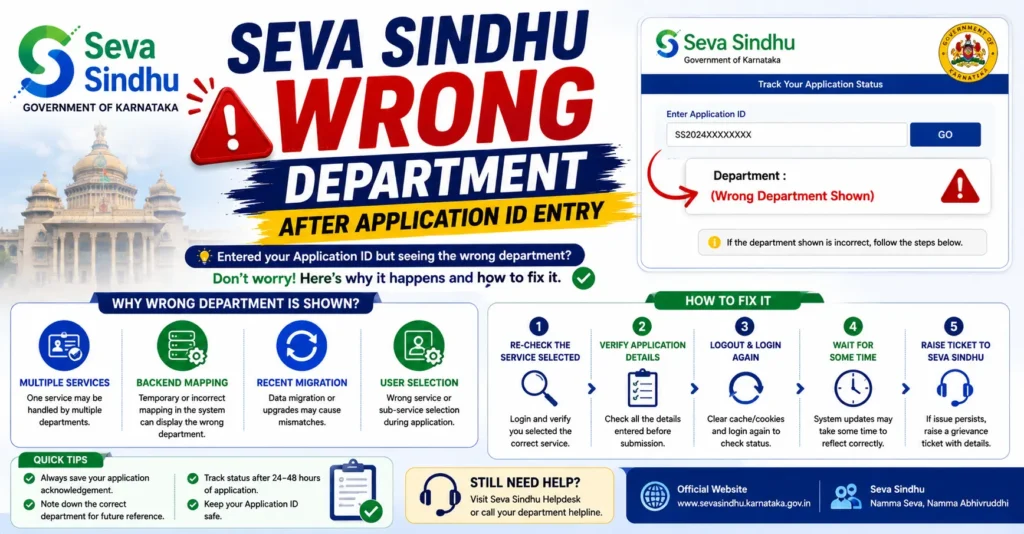
Why Does Seva Sindhu Show the Wrong Department?
There are several hidden reasons why your Application ID may not map correctly to the intended department:
Applications Are Routed to the Wrong Service Category
Seva Sindhu centralizes over 880 government services across different departments. When you submit an application, the portal categorizes it into a department/service category for processing.
Sometimes, due to backend misclassification or similarity in service codes:
This does not necessarily mean your application is lost. It may simply be recorded in the wrong internal category.
Multiple Departments Handle Similar Applications
Certain applications involve more than one department. For example:
Income + Caste Certificates → handled by the Revenue Department
Welfare schemes → processed by Social Welfare or Revenue
Utility subsidies → Revenue or local municipality
The portal sometimes displays the first department it routes your application to, which may look unrelated to you.
Typing Errors in Application Submission
A small error in filling your application — like selecting the wrong service from a dropdown menu — can cause the portal to map your application to a different department.
Even if your documents are correct, the initial choice determines which department the system thinks your application belongs to.
Backend Updates Are Delayed
After submitting your application, the Seva Sindhu portal needs time to synchronize your Application ID with the department’s backend database.
If you check too soon after submission, the portal may temporarily show:
Waiting a day or two often resolves the issue.
Portal Glitches or Server Issues
Technical glitches in the portal or during updates may sometimes display wrong department details for some users.
This is usually temporary
It does not affect the actual processing of your application
Rechecking later or using a different browser can often resolve it
Application Submitted Through a Service Center
If you applied via a Common Service Center (CSC), Karnataka One, or Gram One, your application may have a different internal ID or department mapping.
In these cases, the physical or backend record is still valid, but the portal display may confuse first-time users.
Step-by-Step Fixes for Wrong Department Display
Here’s what you can do if Seva Sindhu shows the wrong department:
Verify Your Application ID
Copy the Application ID exactly from your submission receipt or SMS confirmation
Avoid manual typing to prevent errors
Check Your Submitted Details
Ensure you select the correct service and department while submitting
If you mistakenly selected the wrong option, note this for follow-up
Log in to Your Seva Sindhu Dashboard
Public tracking pages may display incorrect department details
Log in using your registered mobile number or Aadhaar
Your dashboard should show the correct application details linked to your account
Use Department-Specific Status Pages
Some applications are handled by specific departments
For example: Revenue → Certificates
Social Welfare → Subsidy schemes
Visit the department-specific tracking page and enter your Application ID there
Clear Browser Cache or Use Incognito Mode
Old cache may display outdated or incorrect data
Use incognito/private browsing mode for accurate information
Wait for Backend Updates
If the application is very recent, the portal may take 24–48 hours to synchronize with the correct department
Avoid repeated submissions or multiple status checks in a short period
Contact the Relevant Department
If the wrong department persists, call or email the department handling your service
Provide Application ID, service name, and submission date
Departments can verify your application in their backend system
Visit the Nearest Service Center
CSC, Karnataka One, or Gram One staff can check backend records
Bring: Aadhaar number
Registered mobile number
Application receipt
Reference ID
They can confirm the department and escalate if needed.
Tips to Avoid Department Confusion
- Select the correct service during the application
- Double-check all details before submitting
- Keep your receipt and reference number safe
- Track applications after at least 24 hours
- Avoid submitting duplicate applications — it may confuse department mapping
- Use official portals and trusted service centers. You can also read: Why Seva Sindhu OTP Fails Even When Your Aadhaar Is Linked
FAQs
Final Words
Seeing the wrong department on Seva Sindhu can be confusing, but it’s usually not a problem with your application. Most of the time, it’s due to backend mapping, portal glitches, or minor errors in service selection.
By carefully checking your Application ID, using the dashboard, waiting for synchronization, and contacting the department or service center if necessary, you can track your application accurately and avoid confusion.


