
Seva Sindhu “Submitted” Forever? Quick Fixes & Tips
Filing your application on the Seva Sindhu Portal should be a smooth process — but sometimes, after submitting, you check the portal, and your application status still shows “Submitted”… even after days or weeks!
If this is happening to you, don’t panic. Many users face the same issue. Most of the time, it’s not a serious problem, and there are easy ways to check and resolve it. In this guide, I’ll explain why your application might be stuck at “Submitted” and what you can do to get it moving.
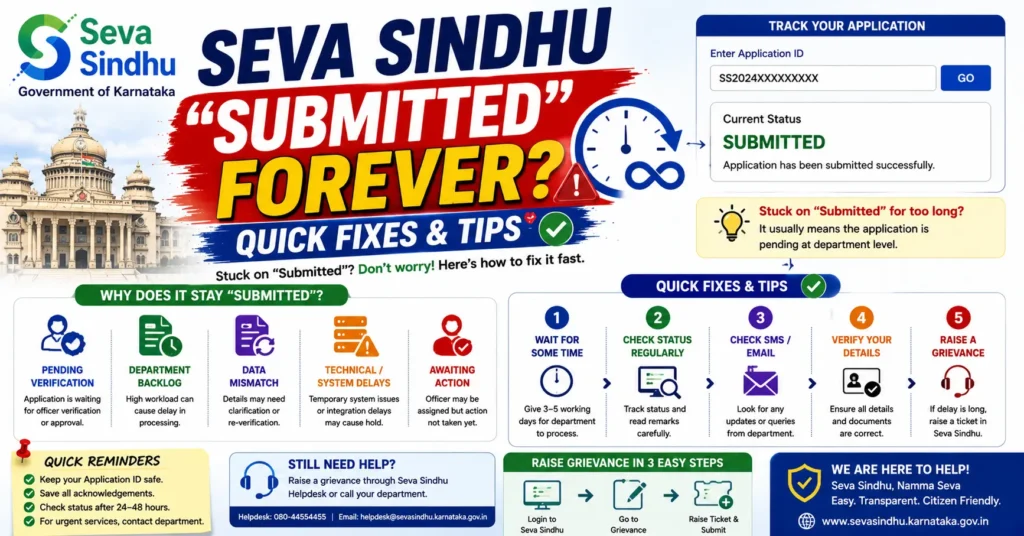
Why Does “Submitted” Stay Forever?
There are several reasons why your Seva Sindhu application might remain in the “Submitted” status:
Processing Time Varies by Department
Each department handles applications differently. For example: Caste Certificates may take 7–15 days
Income Certificates may take 5–10 days
Welfare schemes like Gruha Jyothi may take longer due to verification
The portal may show “Submitted” until the department officially updates the status.
Pending Verification
Some applications require verification by local authorities before processing.
For instance, revenue officials may need to verify your documents or visit your residence for schemes like housing subsidies.
Until verification is completed, the portal keeps showing “Submitted.”
Server or Portal Delays
During peak hours or system maintenance, the portal can lag in updating statuses.
Even if the department has processed your application, it might take some time to reflect online.
Missing or Incorrect Information
If some information or documents are missing or incorrect, the application may stay in “Submitted” status.
Departments might hold the application until corrections are made.
Technical Glitches
Occasionally, a bug or server issue can cause the portal to freeze the status at Submitted.
This is usually temporary and resolves once the server is stable.
Step-by-Step Guide to Fix “Submitted” Status
Here’s what you can do if your Seva Sindhu application seems stuck:
Wait for the Normal Processing Time
Check the expected processing time for your application type.
Many delays are just part of normal processing.
Tip: Keep a small notebook or notes on your phone to track submission dates.
Double-Check Your Documents and Information
Make sure you have uploaded all required documents in the correct format.
Ensure your Aadhaar, phone number, and other details match official records.
Quick Tip: Mistyped details are the most common cause of processing delays.
Refresh or Re-login to the Portal
Log out and log back in to see if the status updates.
Sometimes, browser cache can make the portal display outdated information.
Pro Tip: Try incognito/private mode for accurate status display.
Contact the Relevant Department
If your application exceeds the normal processing time, call or email the relevant department (Revenue, Welfare, Transport, etc)
Provide your application number and submission date
Most departments can confirm if your application is under processing or needs attention.
Visit a Common Service Centre (CSC)
CSC staff can check the status in the backend system.
They can guide you if documents are missing or escalate applications if necessary.
Tip: Take a printout of your application or keep your submission receipt handy for verification.
Escalate If Needed
If your application remains in “Submitted” for an unusually long time, write an official grievance through Seva Sindhu’s complaint system
Mention your application number, date, and type of service
Departments usually respond within a few days after escalation.
Tips to Avoid Getting Stuck in “Submitted” Status
Check Requirements Before Submitting – Make sure all documents and fields are complete.
Upload Clear Scanned Copies – Blurry images or wrong file formats can cause delays.
Track Your Application – Note the submission date and expected processing time.
Avoid Peak Hours – Submitting during server load can sometimes delay confirmation.
Keep Your Mobile Number Updated – Officials may need to contact you for verification.
You can also read: Seva Sindhu Wrong Department After Application ID Entry
FAQs
Final Words
Seeing your Seva Sindhu application stuck at “Submitted” can be stressful, but in most cases, it’s just a normal delay due to verification, processing, or portal lag.


