
Why Seva Sindhu OTP Fails Even When Your Aadhaar Is Linked
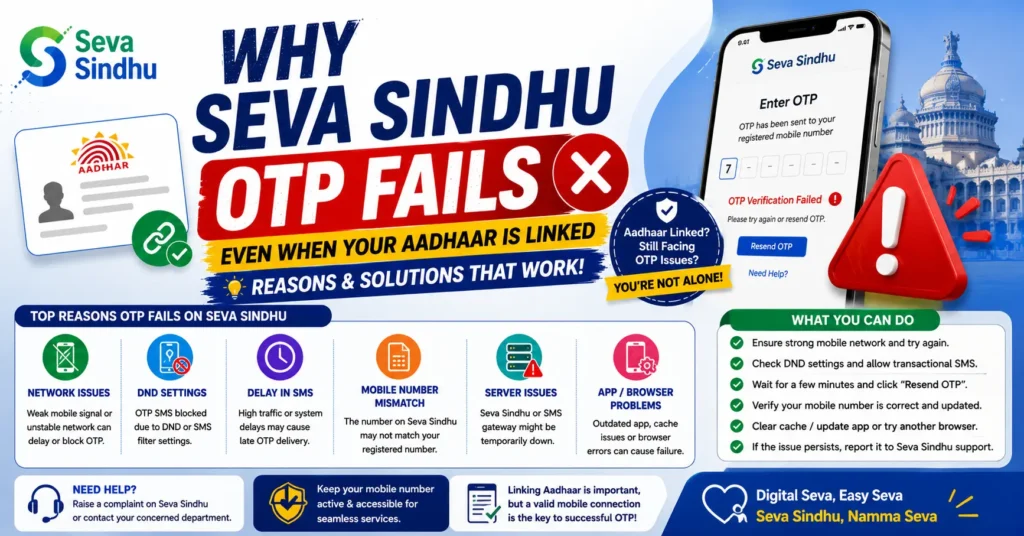
Trying to log in to the Seva Sindhu Portal only to find that the OTP never arrives can be extremely frustrating — especially when your mobile number is already linked to your Aadhaar. You do everything right, but that one SMS never shows up.
Don’t worry — you are not alone. Many people face this problem, and most of the time, it’s caused by simple, fixable issues. In this article, I’ll walk you through the common reasons why your OTP fails, practical solutions, and tips to avoid it happening again. Think of this as a friendly guide, like I’m helping a friend who’s stuck.
What is an OTP and why is it Important?
An OTP (One-Time Password) is a 6-digit code sent to your registered mobile number. The portal uses it to verify that you are the rightful person trying to access or apply for services. Without this code, you cannot log in, apply for certificates, or track the status of any applications.
Even if your number is linked to Aadhaar, issues with the network, server, or portal can prevent the OTP from arriving. Understanding the root causes helps you solve the problem quickly.
Common Reasons Your OTP Fails
Your Mobile Number Isn’t Properly Linked to Aadhaar
Even if you believe your number is linked, sometimes the Aadhaar database hasn’t updated properly. This can happen if:
You recently changed your number
There was a delay in updating the records
There was a typo during registration
Solution:
Check whether your mobile number is still linked to Aadhaar. If it’s not, update it at the nearest Aadhaar service center. Make sure your details are accurate to prevent OTP failures.
Poor Mobile Network or Weak Signal
Even a linked number won’t receive OTP if your mobile network is unstable. Poor signal or slow internet can prevent SMS from being delivered or delayed for hours.
Tips:
Move to a location with better mobile reception
Try switching from mobile data to Wi-Fi if possible
Avoid areas where network congestion is common, like busy offices or markets
High Server Traffic on the Portal
During peak times — like when a new scheme is launched or during daytime working hours — the Seva Sindhu servers can get overloaded. This can delay OTPs or prevent them from being generated.
Best Practices:
Try logging in early morning or late evening when traffic is lower
Avoid repeated OTP requests during busy hours
DND (Do Not Disturb) or SMS Blockers
Many phones or telecom plans have Do Not Disturb (DND) activated, which can block OTP messages. Additionally, SMS-blocking apps or spam filters might prevent messages from reaching you.
Fix:
Temporarily turn off DND
Disable any SMS-blocking apps while requesting OTP
Too Many OTP Requests in a Short Time
Clicking “Send OTP” multiple times within a few minutes can trigger a temporary block on your number. The portal restricts OTP requests to prevent misuse.
Tip:
Wait at least 3–5 minutes before trying again
Be patient, sometimes the system takes time to send the code
Browser Issues or Device Glitches
Sometimes the problem isn’t with your mobile number or network but with your device or browser. Cached data, cookies, or outdated browsers can interfere with OTP generation.
Quick Fix:
Clear your browser cache and cookies
Use incognito or private mode to avoid old data conflicts
Try a different browser like Chrome, Firefox, or Edge
Restart your device to refresh network connections
Temporary Portal Glitches or Maintenance
Like any online platform, the Seva Sindhu portal can experience glitches or downtime. During such times:
OTPs may fail to send
You might see errors like “Service Unavailable.”
Tip:
If this happens, wait for 10–15 minutes and try again. Usually, the system resolves itself once the servers stabilize.
Outdated Mobile Apps or System Software
If you’re accessing Seva Sindhu through a mobile app, make sure the app is updated. Older versions might have bugs affecting OTP delivery. Similarly, ensure your phone’s operating system is updated for better compatibility with portal features.
Step-by-Step Quick Troubleshooting
Here’s a simple checklist to fix OTP issues quickly:
Following this checklist will solve most OTP-related problems. You can also read: Seva Sindhu Portal Not Loading During Peak Hours – Fixes
Extra Tips From Real Users
Try using a different device or mobile to request OTP
Keep your SMS inbox clear; full inboxes can block new messages
Avoid multiple tabs or repeated form submissions, as this can confuse the portal
If persistent problems occur, visit the nearest Common Service Center (CSC) for assistance
FAQs
Final Words
Not getting an OTP on the Seva Sindhu portal can be frustrating, but most problems are simple and fixable. The common causes are a weak network, DND settings, server congestion, or outdated Aadhaar links.
With the step-by-step troubleshooting tips above, you can usually get your OTP within minutes. Remember: be patient, check your settings, and follow the checklist carefully. Once you solve it, accessing government services through Seva Sindhu becomes smooth and stress-free.
OTP problems are common, but with the right approach, you can overcome them without hassle. Keep this guide handy, and next time an OTP doesn’t come, you’ll know exactly what to do.


