
Get Seva Sindhu Status When Reference Number Fails
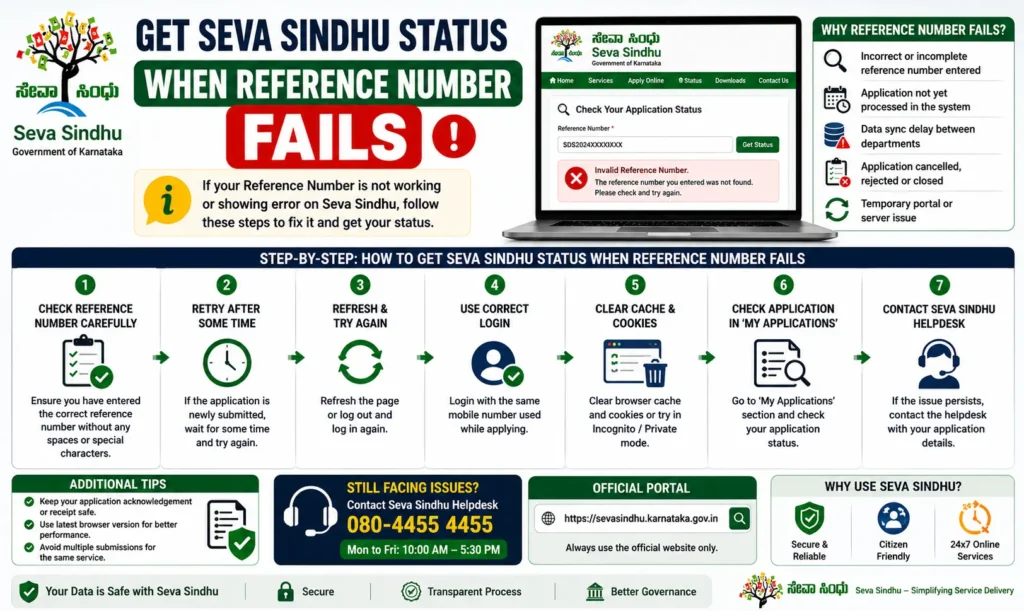
Checking your Seva Sindhu application status should be simple. You enter your reference number, click the status button, and get your update. But sometimes the portal does not cooperate.
You may enter the correct reference number and still see errors like:
“Invalid reference number”
“No records found”
“Application details not available.”
“Please enter valid details.”
Or the page may refresh without showing anything.
If this is happening to you, don’t worry. Your application is not always lost. In many cases, the issue is with the way the portal reads the reference number, the browser, the department database, or a delay in updating records.
In this guide, I’ll explain simple tricks to get your Seva Sindhu status when your reference number is not working.
What Is a Seva Sindhu Reference Number?
A Seva Sindhu reference number is the unique number given after you submit an application on the portal. You may receive it through SMS, email, printed receipt, or on the final submission page.
This number is important because it helps you track your application. It connects your request to the correct department, service, and applicant details.
But sometimes, even a correct reference number may not work. That does not always mean your application has failed.
Why Your Seva Sindhu Reference Number May Not Work
Before trying the tricks, it helps to understand why the issue happens.
You entered the wrong number by mistake
This is very common. Many reference numbers have letters, numbers, slashes, or special formats. A small typing mistake can show “No records found.”
For example, users may confuse:
O and 0
I and 1
S and 5
B and 8
So always copy the number from the official receipt instead of typing it manually.
The application is too new
If you submitted your application recently, the status may not appear immediately. Sometimes the portal takes time to update the backend record.
This can happen especially during busy periods, scheme deadlines, or when many people are applying for the same service.
Wait for at least 24 to 48 hours before assuming there is a problem.
You are checking in the wrong tracking section
Seva Sindhu has many services. Some services may have separate tracking options. If you check your application in the wrong section, the portal may not find it.
For example, a certificate application, transport-related service, and welfare scheme application may not always show in the same tracking flow.
The browser cache is showing old data
Your browser may store cached data from the old website. Because of this, the portal may not load fresh records properly.
This is why the same reference number may fail in one browser but work in another.
Department status is not updated yet
Seva Sindhu acts like a common service platform, but the actual processing may happen with different departments. If the department has not updated the status, the portal may not show the latest result.
This is common for applications that need manual verification.
Your application was submitted through a service center
If you applied through a CSC, Gram One, Karnataka One, Bangalore One, or another service center, your receipt format may be different. Sometimes the number on the receipt is not the same as the online tracking reference number.
You may need to check with the center where you applied.
Copy and Paste the Reference Number Carefully
The first and easiest trick is to avoid typing the number manually.
Open your SMS, email, receipt, or PDF confirmation and copy the reference number exactly. Then paste it into the tracking box.
Before clicking submit, check these things:
Remove extra spaces before or after the number.
Do not add symbols unless they are part of the reference number.
Use capital letters if the reference number contains letters.
Do not confuse zero with the letter O.
This small step solves the problem for many users.
Try Tracking After Logging In
If public status tracking is not working, log in to your Seva Sindhu account and check your dashboard.
Sometimes the public tracking page fails, but the logged-in dashboard shows your application.
After logging in, look for sections like:
My Applications
Application History
Submitted Applications
Track Status
Service Requests
If your application appears in your dashboard, open it from there instead of entering the reference number again.
This works well when the reference number is correct, but the public tracking page cannot fetch the record.
Use Your Mobile Number or Aadhaar-Based Login
Some services are connected to your registered mobile number or Aadhaar details. If the reference number is not working, try logging in using the same mobile number used during application submission.
Once logged in, check whether your application is listed under your profile.
Make sure you use the same mobile number that you entered during the application process. If you use another number, the portal may not show your record.
Clear Browser Cache or Use Incognito Mode
If the portal is showing repeated errors, open it in incognito or private mode.
This gives you a fresh browser session and avoids old cookies or cached data.
You can also try:
Clearing browser cache
Using another browser
Switching from mobile to laptop
Try Chrome, Firefox, or Edge
Restarting your device
Many users find that the status works on a different browser even when it fails on their regular one.
Try During Off-Peak Hours
The Seva Sindhu portal may slow down when many users visit at the same time. During peak hours, tracking may fail or show “No records found” even when the application exists.
Try checking your status during low-traffic times, such as:
Avoid checking repeatedly during busy hours, because the portal may temporarily block or delay requests.
Check the Correct Department or Service Page
Not every Seva Sindhu application is tracked in the same way. Some services may redirect to department-specific pages.
If your reference number is not working, ask yourself:
If yes, try checking through the service-specific status page or contacting the department handling that service.
Use the Receipt Number Instead of the SMS Number
Sometimes users receive more than one number after applying. One may be an acknowledgement number, another may be a reference number, and another may be a transaction number.
If one number does not work, try the other numbers shown on your receipt.
Look for labels like:
Do not use the payment transaction ID for application tracking unless the portal specifically asks for it.
Wait If the Application Was Just Submitted
If you submitted the application today, wait before checking again. The portal may need time to sync your record.
A good rule is:
Wait 24 hours for normal services.
Wait 48 hours if there is heavy traffic.
Wait longer for services requiring manual verification.
Checking too soon can show “No records found” even when the application was submitted correctly.
Confirm That Your Application Was Successfully Submitted
Sometimes users think they submitted the form, but the final submission did not happen due to network failure, payment failure, or session expiry.
Check whether you received:
If you did not receive any confirmation, your application may not have been completed. In that case, check your account dashboard or visit the service center where you applied. You can also read: How to Report a Lost Seva Sindhu Device — Step-by-Step Guide
Visit the Nearest Service Center
If nothing works, visit a nearby CSC, Karnataka One, Bangalore One, Gram One, or related service center.
Take these details with you:
Aadhaar number
Registered mobile number
Application receipt
Reference number
Date of submission
Service name
Payment receipt, if available
The staff may be able to check your application through backend access or guide you to the correct department.
What Not to Do When the Reference Number Is Not Working
Do not submit the same application again immediately. Duplicate applications may create confusion or delay processing. Do not keep clicking the status button again and again. This may cause temporary errors. Do not share your Aadhaar number, OTP, or login password with unknown people.
Do not trust unofficial agents who promise “instant approval.” Always use official channels or verified service centers.
Quick Checklist to Fix the Issue
Check the reference number carefully.
Remove extra spaces while entering it.
Try logging in and checking the dashboard.
Use the same mobile number used during the application.
Clear browser cache or use incognito mode.
Try another browser or device.
Check after 24 to 48 hours.
Try different numbers from your receipt.
Visit a service center if the issue continues.
FAQs
Final Words
When your Seva Sindhu reference number is not working, it can feel stressful. But in most cases, the issue is small and fixable. It may be a typing mistake, browser problem, server delay, wrong tracking section, or a backend update delay.
Start with the simple tricks first: copy the number carefully, check your dashboard, use incognito mode, and try again after some time. If the problem continues, visit a nearby service center with your receipt and registered mobile number.


